Creating Custom School Name Signs: A Guide to Using SVG Laser Cut Files
Personalizing educational spaces has become a significant trend for teachers, parents, and school administrators. Among the various methods available for creating custom decor, laser cutting offers a precise and professional finish. The Tools Name Sign SVG Laser Cut File represents a specific category of digital resources designed to streamline this process. These files are not merely images; they are vector-based instructions that guide machinery to cut materials with high accuracy. Understanding how these digital downloads function, their compatibility with various machines, and their advantages over other customization methods is essential for anyone looking to create durable, attractive signage.
Understanding the Digital Asset
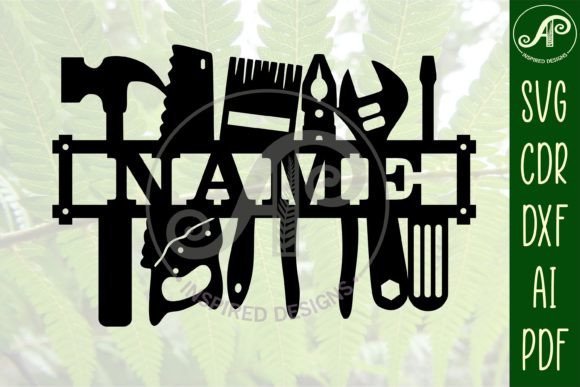
A Tools Name Sign SVG Laser Cut File is a pre-designed template intended for personalization. Typically, these designs feature a structural frame or decorative element where a name can be inserted. The primary value lies in the file formats provided. Unlike standard raster images (such as JPEGs or PNGs), vector files like SVG, DXF, AI, and CDR contain mathematical paths rather than pixels. This distinction is critical for laser cutting and CNC routing because it allows the design to be scaled to any size without losing resolution or clarity.
The specific design discussed here is tailored for school environments, suitable for door or wall hanging. It is engineered with exterior cut lines, often color-coded (for example, in blue) to help users distinguish between cut lines and engrave lines within their software. This attention to detail reduces setup time and minimizes errors during the production phase. The design is versatile, originally sized for a height of 27cm (approximately 10.6 inches), but its vector nature means it can be resized smaller for desk ornaments or larger for prominent wall displays without compromising the integrity of the cut paths.
File Formats and Machine Compatibility
One of the most significant considerations when purchasing digital cut files is compatibility. Different crafting machines and software ecosystems prefer different file types. A comprehensive digital download package typically includes multiple formats to ensure broad usability.
- SVG (Scalable Vector Graphics): This is the most universal format for modern hobbyist laser cutters and cutting plotters. It is natively supported by software used with Glowforge, Cricut Design Space, and Silhouette Studio. SVGs are lightweight and easy to import.
- DXF (Drawing Exchange Format): Preferred by users of industrial-grade laser cutters and CNC routers. DXF files are widely compatible with CAD software and older cutting systems that may not support SVG.
- AI (Adobe Illustrator) and PDF: These formats are ideal for users who wish to edit the design extensively before cutting. Adobe Illustrator provides robust tools for manipulating vector paths, ensuring that every curve and angle meets specific aesthetic requirements.
- CDR (CorelDRAW): For professionals using CorelDRAW, having a native CDR file saves time on conversion and ensures that layer structures and node points remain intact.
Having access to all these formats means that whether you are using a desktop diode laser, a CO2 laser cutter, or a vinyl cutter, the Tools Name Sign SVG Laser Cut File can be adapted to your workflow. This flexibility is a major advantage over single-format downloads, which may require complex conversion processes that can introduce errors in the cut paths.
Design Customization and Font Selection
The aesthetic appeal of a name sign largely depends on typography. The template in question uses Clarendon BT for the name placeholder, a serif font known for its readability and classic appearance. However, the true strength of this digital asset is its adaptability. Users are not locked into a single typeface. Any all-caps font can be substituted, allowing for complete creative control.
When selecting a font, it is important to consider the physical limitations of the cutting material. Thin, delicate scripts may break easily when cut from wood or acrylic, especially at smaller scales. Bold, sans-serif, or sturdy serif fonts like Clarendon BT are generally more durable. The design requires the user to link the name text to the main structure before cutting. This step ensures that the letters are not loose pieces but are integrated into the sign’s frame, providing structural stability.
Workflow Integration: LightBurn and CorelDRAW
For users familiar with LightBurn, a popular laser control software, the process is straightforward. First, the SVG file is imported and ungrouped. This separates the decorative elements from the text placeholder. Next, the user types the desired name, selects an appropriate font, and resizes the text to fit within the designated area of the design. It is crucial to weld or unite the text with the frame if the design calls for it, ensuring that the laser treats the entire assembly as a single continuous cut path. Testing in software like LightBurn or CorelDRAW allows users to simulate the cut, checking for any overlapping lines or unclosed paths that could cause the laser to behave unpredictably.
CorelDRAW users benefit from the native CDR file, which preserves layer information. This makes it easier to assign different colors to different operations, such as setting cut lines to red and engrave lines to black. This level of control is particularly useful for complex designs where depth and texture are desired.
Comparing Digital Downloads to Custom Commissioning
When deciding how to acquire a custom name sign, individuals often weigh the option of purchasing a digital file against commissioning a fully finished product. Each approach has distinct tradeoffs.
Cost Efficiency: Purchasing a Tools Name Sign SVG Laser Cut File is significantly cheaper than buying a finished sign. The cost is limited to the digital asset and the raw material. For schools or teachers needing multiple signs, this cost savings multiplies. Conversely, commissioned signs include labor, machine time, and profit margins, making them expensive for bulk orders.
Time and Effort: The digital download route requires time and skill. The user must have access to a laser cutter or CNC machine, know how to operate the software, and source materials. If a user lacks these resources or skills, the digital file is useless. Commissioning removes this burden entirely, offering a ready-to-hang product. However, for hobbyists or schools with maker spaces, the process of creating the sign can be an engaging project in itself.
Customization Speed: With a digital file, changes can be made instantly. If a name is misspelled or a different font is preferred, the user can adjust the file and cut a new sign immediately. Commissioned work involves back-and-forth communication with the creator, leading to longer turnaround times for revisions.
Material Considerations and Best Practices
The choice of material impacts the final look and durability of the sign. Common materials for laser-cut name signs include plywood, MDF, acrylic, and hardwoods. Plywood offers a natural, warm aesthetic suitable for classrooms, while acrylic provides a modern, sleek look. When using the Tools Name Sign SVG Laser Cut File, it is important to adjust laser settings based on the material thickness and type. Thicker materials may require multiple passes or slower cutting speeds.
Additionally, the size of the sign affects material choice. A 27cm high sign is substantial enough to use thinner materials like 3mm plywood without sacrificing rigidity. If scaling down significantly, thicker materials might be necessary to prevent warping or breaking. Conversely, scaling up may require stronger materials to support the weight of the sign, especially if it is to be hung on a door.
Decision Factors: Is This the Right Choice?
Determining whether a Tools Name Sign SVG Laser Cut File is the right solution depends on several factors. It is an excellent choice for individuals who already own or have access to laser cutting equipment. It is also ideal for those who enjoy the creative process of design and fabrication. Educators who need to update signs frequently or create personalized items for students will find the reusability of the digital file invaluable.
However, this option is less suitable for those without technical skills or equipment. If the goal is a one-off sign and the user does not plan to engage in further crafting projects, the learning curve associated with laser cutting software may be too steep. In such cases, purchasing a finished product or using simpler craft methods like vinyl lettering might be more appropriate.
Furthermore, users should consider the precision required. Laser cutting offers high precision, but it requires careful calibration. If a user is unable to achieve clean cuts due to machine maintenance issues, the result may not meet expectations. Regular maintenance of the laser lens and proper focus settings are essential for achieving the clean edges that vector files are designed to produce.
Conclusion
The Tools Name Sign SVG Laser Cut File offers a flexible, cost-effective solution for creating personalized school signage. By providing multiple file formats and a design that accommodates various fonts and sizes, it empowers users to produce professional-quality results. While it requires a certain level of technical proficiency and access to specific machinery, the benefits of customization and repeatability make it a valuable resource for educators, parents, and crafters. Understanding the workflow, from file import to material selection, ensures that the final product is both aesthetically pleasing and structurally sound. For those willing to invest the time in learning the process, the ability to create bespoke signs on demand is a significant advantage.